
Blog
Field notes, guides, and operational evidence from Glassmkr.
Real captures, real failures, real numbers. Every chart on these pages comes from a machine we ran.
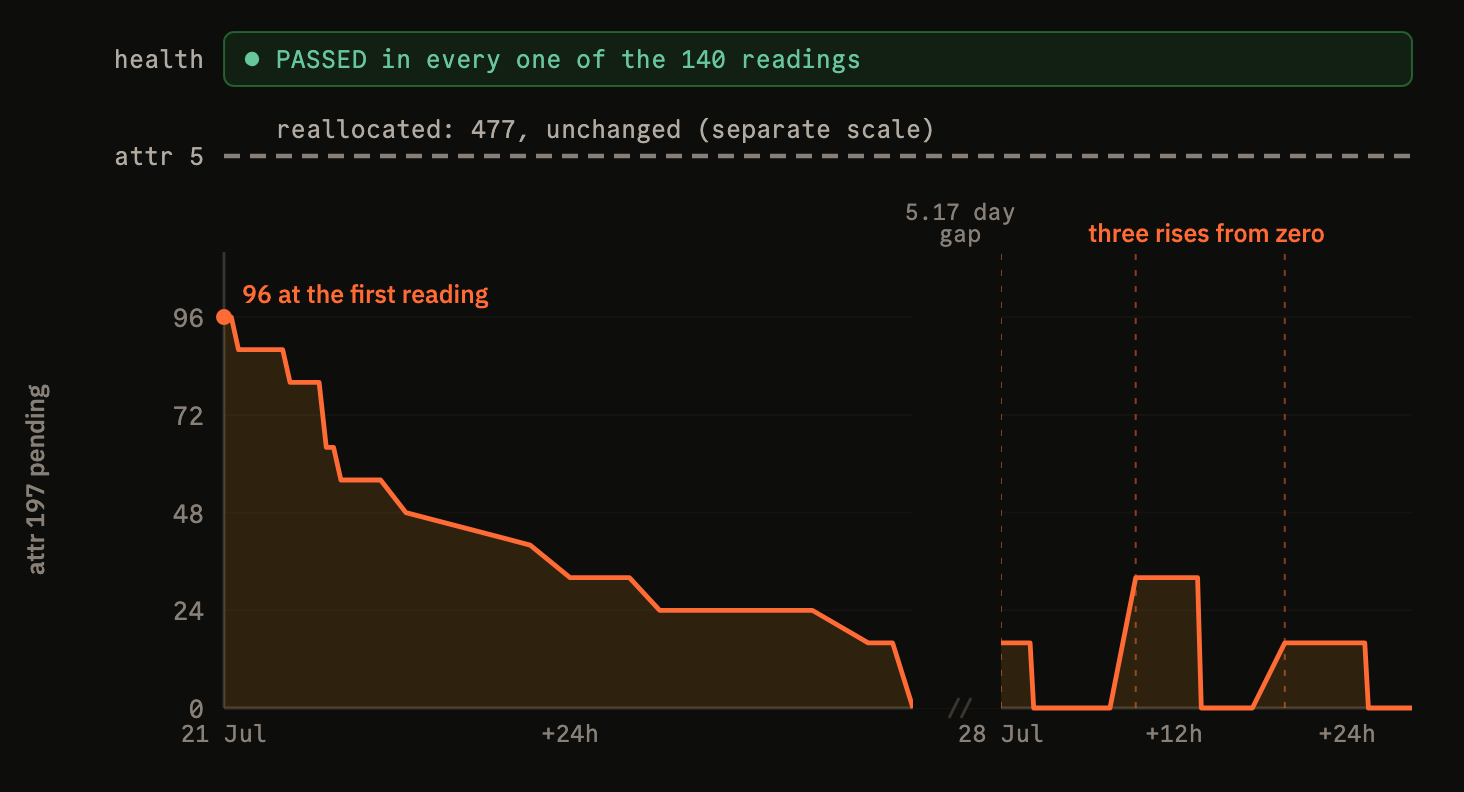
SMART said PASSED. The drive had 477 dead sectors.
We ran a drive-health campaign across thirteen boxes to find out whether early warning actually works. One drive was carrying 477 reallocated sectors and reported its own health as PASSED in all 140 readings we took, a full write-and-verify pass over it came back clean, and the four healthy drives we tried hardest to destroy refused to break. Including the part we cannot yet answer.

Manage your fleet by talking to it
Glassmkr now speaks the Model Context Protocol: an AI client connects to your fleet with a browser sign-in and can query it, and with the scopes you grant, manage it. The interesting part was making a delete safe to hand an LLM: a scope you grant, a two-step confirmation, and a soft delete you can undo.
-
Monitoring your customers can automate
Dedicated servers ship with console access and traffic graphs; the layer that predicts hardware failure is usually the customer's problem to assemble. Every step of that layer, registering servers, installing the agent, routing and testing alert channels, is an API call, and that changes who can offer it.
-
One account key, zero per-host secrets
Most fleets onboard into monitoring by copying one powerful credential onto every box. glassmkr-crucible enroll does the opposite: one account key stays in your control plane, each host self-registers by a stable machine ID and holds only its own collector key, and running the automation twice does nothing.
-
Same model, same server, opposite result: the half of agent testing everyone forgets
We gave nine open-weight models root on real broken servers and graded every claim against the machine, not the model's own report. The thing that most decided success was not model size. It was whether our harness spoke the language the model was trained in: North scores 0 in plain text and 7 with tools, Phi-4 is the mirror.
-
We gave Claude Haiku root on a broken server
We ran our standing validation exercise with Claude Haiku 4.5, the smallest model in the family, on a real bare-metal server with four firing alerts. It fixed what it should, correctly declined to touch healthy hardware, and surfaced a false-positive bug in our own monitoring.
-
Half the "problems" on a marketplace GPU host are required config
Three alert rules fired on every box in our GPU fleet, and all three were correct readings of config a marketplace GPU host is supposed to have. The same signal is a finding on one host and required config on another, so we taught Glassmkr the difference with host-type profiles.
-
A single reboot would have de-listed our entire GPU fleet
On these NVIDIA boxes nouveau was never blacklisted, so the next routine reboot would have stopped every GPU verifying and silently dropped the host off the Vast marketplace. The failure mode, the one-line fix, and why monitoring should catch the latent fault before the reboot.
-
We pointed Glassmkr at a 20-box GPU fleet. It went from 88 alerts to 11.
A field report from twenty GPU boxes on Vast: the honest breakdown of 88 alerts down to 11. What was real hardware, what was noise we muted on purpose, what was self-inflicted, and the false positives we then fixed in the product.
-
The most honest AI feature we shipped has no AI in it
We built the self-hosted-Gemma path for our ticket-draft feature, A/B'd it against a plain template on a live degraded-array alert, and shipped the template. The model was fine. Fine did not justify 22 seconds and a hallucination surface. What we kept, what we cut, and why the value was never the prose.
-
Would you have caught my VRM degradation?
A customer's Ryzen 9 5950X lost its VRM and asked if Glassmkr would have caught it. The honest answer was no: voltage alone cannot watch a DVFS core rail. What we built instead (a behavioral signal and a variance-aware voltage-drift signal), what happened when we backtested it on our own MC12-LE0, and the uptime check that stopped us claiming a win we had not earned.
-
What our test suite looks like, and why
Four tests from the code that runs Glassmkr, and the incident that put each one there: a suppressed security alert, a temperature threshold that means different things on different boards, a 404 that has to stay a 404, and a power-supply name captured from a lying BMC. A test suite as a map of what has hurt you.
-
Validating GPU monitoring across three NVIDIA cards: L4, RTX A4000, A16
Three cards, eight rules. We tested three live on real hardware (power-cap throttling on a multi-die A16, thermal load on an L4, driver drift across all three) and deliberately did not induce the other five, because a real uncorrected-ECC or XID fault needs a power cycle to clear. The honest map of what 'GPU monitoring, tested' means.
-
We found a security false-negative in our own monitoring
On RHEL-family hosts, download-only dnf-automatic timers were treated as 'auto-updates configured,' silently suppressing the pending_security_updates alert while Critical patches sat unapplied. What the bug was, how dogfooding caught it, and the fix in Crucible 0.13.6.
-
Cross-vendor IPMI quirks we learned the hard way
Six specific footguns from running monitoring across Supermicro, Gigabyte, ASUS and ASRockRack on Debian, Ubuntu, Rocky, Alma and Proxmox. SEL timestamp shapes, BMC firmware that lies about vendor, distro-specific package gaps, and the Gigabyte DTS +30 °C offset.
-
When your monitoring tool punishes customers for doing the right thing
60 minutes of stale alerts after a legitimate fix. A kernel reboot that fired its own critical alert. Two distinct bugs surfaced when we actually applied our own remediation guidance end to end on the validation fleet.
-
When a Phase 1 audit changed our hypothesis
A server reported 'IPMI: Not detected' while showing ECC counts on the same screen. The spec said our vendor detection was wrong. An hour-long audit said detection was correct and three other things were broken. Map the problem before you write the code.
-
Introducing Furnace: the AI assistant that helps you fix alerts
Furnace reads your alerts, looks at the evidence, and suggests remediation. Self-hosted Gemma 4 26B in Amsterdam. Conservative, hedging, willing to say 'I don't know'. The AI in your monitoring shouldn't be the headline.
-
We used an AI as a controlled probe of our alert documentation
We forbade an AI from using its training data and made it resolve real infrastructure alerts using only the guidance our own dashboard produces. Three gap patterns surfaced. All three fixed in the same week.
-
Training a drive-failure model on a GPU server's CPU
We retrained our drive-failure predictor on 2 years of Backblaze data (222M drive-days) on the CPU of our L4 inference server. Gemma stayed resident in VRAM. 59 minutes, no new compute, 5.8% inference overhead. Plus the feature-importance surprise: SMART 197 beat SMART 187.
-
Introducing Glassmkr: bare metal monitoring built by operators
The original launch post. Two pieces, one philosophy: the Crucible agent plus Dashboard. The plans it describes were retired in August 2026 when the whole stack went open source.
-
We benchmarked Qwen3.6 against our production Gemma 4 on an L4. Here's what actually mattered.
Three-way benchmark of Gemma 4 26B-A4B, Qwen3.6 35B-A3B no-think, and Qwen3.6 35B-A3B thinking on a production infrastructure health analysis prompt. Real wall-clock numbers, VRAM footprints, and the quality-latency tradeoff that matters for narration.
-
IPMI diagnostics for bare metal: what to monitor and how to read it
A practical guide to monitoring IPMI sensors, SEL logs, and BMC health on Dell, Supermicro, and HPE servers. Covers kipmi0 CPU issues, vendor quirks, and what to alert on.
-
What We Learned Running Gemma 4 on an L4 GPU for Production Server Analysis
How we deployed Gemma 4 26B on an NVIDIA L4 for AI health analysis of bare metal servers. Covers model selection, why vLLM failed, quantization choices, and prompting for structured infrastructure output.
-
IPMI, SMART, and RAID: The Hardware Layer Your Cloud Monitoring Tool Ignores
Most monitoring tools stop at the OS. Below it sits an entire hardware layer: disk firmware predicting its own failure, fans at 0 RPM, ECC memory correcting silent errors. Here is what to monitor and why.
-
Why bare metal monitoring is different
Cloud monitoring tools were built for ephemeral workloads. They track HTTP latency and container restarts. But when you run physical servers, the failure modes are fundamentally different: drives wear out, DIMM slots develop bit errors, fans fail silently, and RAID arrays degrade without anyone noticing.